Most B2B products ship with three roles: Admin, Manager, Viewer. That is the right way to start, and it is how Canopy starts too. A new Environment begins flat: one root node, every assignment landing on it. Clone an Environment from one that already runs a hierarchy and the clone inherits it, but an Environment created from nothing is flat.
This post is about the day that stops being enough, and why in Canopy that day costs you a configuration change rather than a rewrite.
What Canopy answers
Canopy is identity and access management for B2B SaaS. It signs your users in, with passwords, passwordless email codes and multi-factor, and it federates to your customers' identity providers over SAML and OIDC with SCIM directory sync. Then it answers one question for your application, on every request:
Can this identity do this action in this part of the organization?
The last five words are the part most teams end up building themselves. Canopy holds the organization's shape, so a role granted at a region applies to every store inside it, including the store opened next quarter.
Your configuration sits in three layers. An Account is your company. Inside it are Applications, one per product whose access you manage. Inside each Application are Environments: isolated copies of your permissions, roles and hierarchy. Signing up creates your first Application with a Development and a Production Environment, and everything below happens inside one of them.
Day one is flat
A new Environment has a permission catalog to fill, no roles, and a single root node. The loop below is five calls, assuming the person you are granting to already exists as an identity with access to the Environment. Each call carries an Environment-scoped API key in X-API-Key; single resources come back under data, collections under items, failures under error.
First, tell Canopy the actions your product has. Permissions are yours to name, lowercase and dot-separated, and you can register them in one request:
curl -X POST https://auth.canopy-io.com/api/v1/permissions \
  -H "X-API-Key: $CANOPY_API_KEY" \
  -H "Content-Type: application/json" \
  -d '{
        "permissions": [
          { "key": "orders.view",   "name": "View orders",   "category": "orders" },
          { "key": "orders.refund", "name": "Refund orders", "category": "orders" }
        ]
      }'
Then bundle them into a role, and set what it grants:
curl -X POST https://auth.canopy-io.com/api/v1/roles \
  -H "X-API-Key: $CANOPY_API_KEY" \
  -H "Content-Type: application/json" \
  -d '{ "name": "Manager" }'

curl -X PUT https://auth.canopy-io.com/api/v1/roles/$ROLE_ID/permissions \
  -H "X-API-Key: $CANOPY_API_KEY" \
  -H "Content-Type: application/json" \
  -d '{ "permission_keys": ["orders.view", "orders.refund"] }'
Now give it to someone. POST /api/v1/assignments takes three ids: who, which role, and where:
{
  "identity_id": "7d3f9b2e-4c1a-4e8b-9f2d-1a6c5e0b8f34",
  "role_id": "b1c4a7e2-5d38-42f0-9c6b-3e8a1f7d0c95",
  "node_id": "e6b2d8f4-9a1c-4d7e-8b3f-2c5a9e1d6f48"
}
That node_id is the Environment's root, and in a flat Environment it is the only node there is. Which is the point: the column that will later carry your customers' structure is already in the schema, holding a constant.
Finally, ask:
curl -X POST https://auth.canopy-io.com/api/v1/permissions/evaluate \
  -H "X-API-Key: $CANOPY_API_KEY" \
  -H "Content-Type: application/json" \
  -d '{
        "identity_id": "7d3f9b2e-4c1a-4e8b-9f2d-1a6c5e0b8f34",
        "permission": "orders.refund",
        "scope": "app_wide"
      }'
scope is required, and app_wide is the flat question: does this identity hold this permission anywhere in the Environment. The answer says so, and says what it was not:
{
  "data": {
    "allowed": true,
    "permission": "orders.refund",
    "scope_evaluated": "app_wide",
    "effective_node_id": null,
    "granting_roles": []
  }
}
effective_node_id is null and granting_roles is empty because an app_wide answer is not anchored to a node. Both fill in once you ask a narrower question, which is the next section.
The day flat stops working
It arrives as a sales conversation, not a bug report. A customer with forty stores wants a regional manager who can refund in the twelve stores in their region and nowhere else.
With flat roles there are two ways out, and both are bad. You bake the place into the role name, manager-west, manager-east, and now your role catalog grows with your customers' real estate, and every role means something different per tenant. Or you assign Manager separately at each of the twelve stores, which works until the thirteenth store opens with nobody able to refund in it, and nobody notices for a week.
{ "role": "manager-west" }{ "role": "manager", "node": "region/west" }The second shape is the one that survives a reorganization. The role says what someone does. The node says where. Moving a branch between regions changes one of those and not the other.
Turning on the hierarchy
Switching an Environment to hierarchical access control is a wizard in the Developer Console, under Access Control → Overview, where the two models sit side by side as cards. Enable Hierarchy asks you for your levels, top down, and nothing else: Region, District, Store. It reviews them against a root, and then drops you on the Hierarchy page with a tree holding one node.
Those levels become the Environment's hierarchy_schema, which you can also write directly if you provision from code:
{
  "node_types": ["application", "region", "district", "store"],
  "allowed_children": {
    "application": ["region", "district", "store"],
    "region": ["district", "store"],
    "district": ["store"],
    "store": []
  },
  "max_depth": 4,
  "root_node_type": "application"
}
Two things to read off that. The root tier is prepended for you: your levels hang beneath the Environment's root node, which is typed application and named after your Application. And the wizard is permissive by default, letting each tier contain any tier below it, so a store may sit directly under a region when a region has no districts in it. If your structure is stricter than that, write allowed_children yourself and map region to ["district"] alone.
Either way the schema is enforced, not advisory. Canopy validates it on every node create and every node move, and max_depth, which runs from 1 to 16 and counts the root tier, stops a tree growing past the shape you declared. A type mapped to an empty list is a leaf and takes no children.
The nodes themselves are ordinary API resources, or a drag-and-drop tree in the Console. The two are different routes, the public API and the Console's own, over the same operations underneath, so a tree built by hand and a tree built from a provisioning script are the same tree. What matters is what an assignment means once they exist.
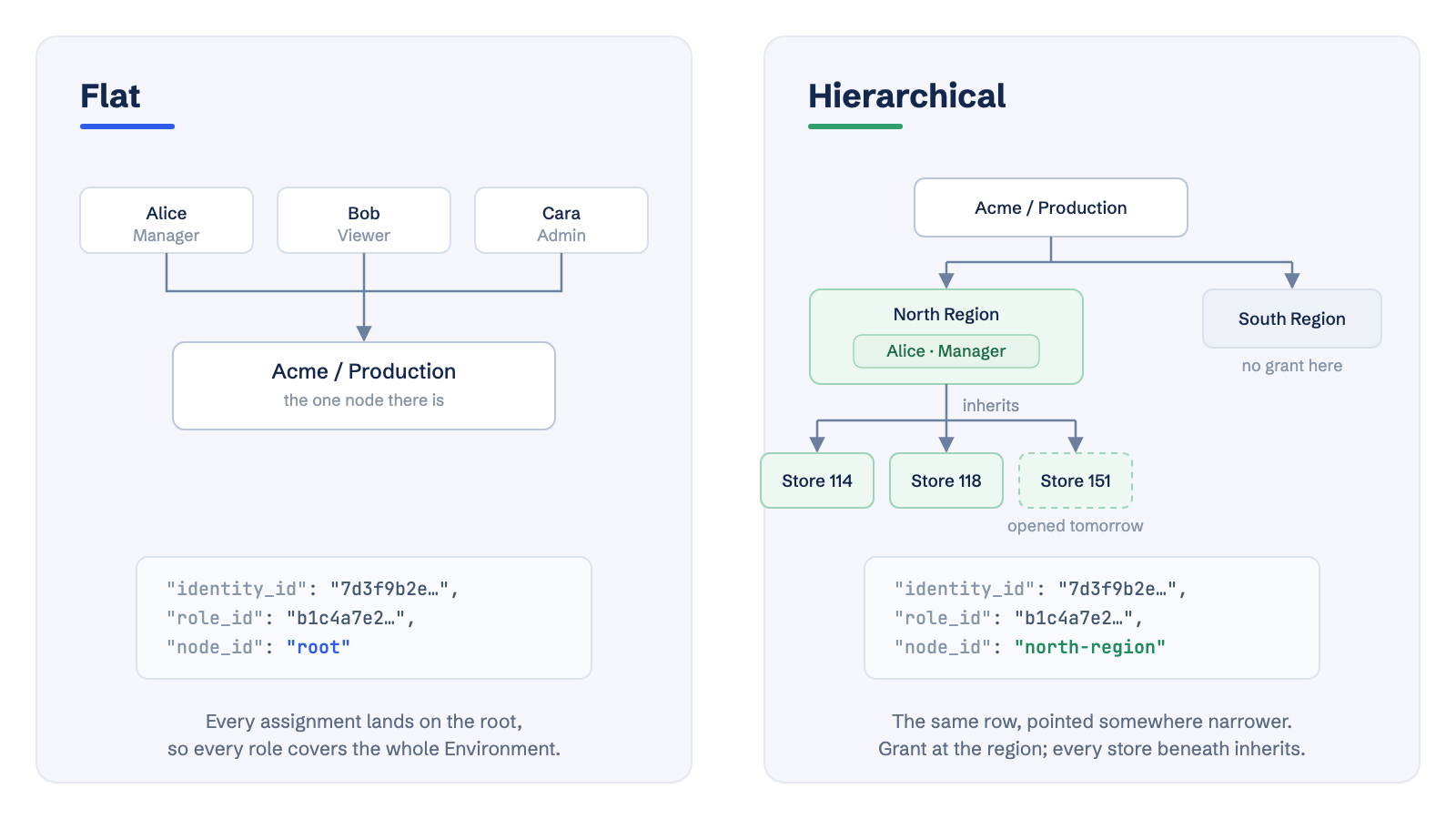
A role assigned at a node applies at that node and every node beneath it. Assign Manager to Alice at North Region and she holds it in all twelve stores, and in the thirteenth on the day it is created, because nothing about it was enumerated. Canopy resolves this at evaluate time by walking from the node in question up to the root, collecting every assignment along the way and unioning the permissions of the roles that are active.
Be precise about what the switch itself did, because it is easy to oversell. Enabling the hierarchy writes the schema and makes sure a root node exists. It does not touch a single assignment. Everyone who held a role at the root still holds it at the root, and a role at the root still reaches every node you go on to create, so nobody loses access and there is no migration step to run or to roll back.
What it does not do is narrow anyone for you, and it cannot. Alice was granted Manager across the whole Environment, and Canopy has no way of knowing that she should now hold it in the North region alone. Scoping her down is a deliberate act: assign Manager at North Region, then remove the assignment at the root. Do that for the people whose authority should become regional, and leave the ones whose authority really is env-wide exactly where they are.
That is the honest shape of the move. The structure costs you a wizard; re-pointing the people who should be narrower costs you one assignment each, once.
What changes in your application
One line changes, and one is added.
{
  "identity_id": "7d3f9b2e…",
  "permission": "orders.refund",
  "scope": "app_wide"
}{
"identity_id": "7d3f9b2e…",
"permission": "orders.refund",
"scope": "node",
"node_id": "9c2f71a4…"
}scope: "node" is the real question, and it is the one your guarded routes should ask: may this person refund this order, which belongs to that store. The answer now carries the node it was anchored to and the roles that produced it, which is what you want in a log when someone asks why a refund went through.
Keep app_wide for the loose question it is good at, hiding a menu item for someone who holds a permission nowhere at all. It is the wrong guard for a resource that belongs to a node, because it answers "somewhere" and the resource lives "here".
What the tree makes possible
Some features only have a meaning once there is structure, and they are the reason the move is worth making beyond the one customer who asked.
Lists, not just checks. The first real query in a hierarchical app is not "may they do this here", it is "show me everything they may see". GET /api/v1/identities/{id}/accessible-nodes?permission=orders.view returns the grant roots, the nodes beneath them, and env_wide when nothing needs filtering at all. Feed the nodes to your own IN (...) and the list is scoped without a per-row check. Past max_nodes, ten thousand by default, the set is not sent: complete comes back false and nodes null, and you filter on the roots against your own tree instead, minus the excluded_roots a deny carves out. Worth handling on the first write rather than the first large tenant.
Denies. A deny refuses a permission at a node and everything under it, whatever any role grants, and no assignment lower down undoes it. Denies are checked before grants, and the decision comes back with the deny_id that caused it. This is how you suspend one branch during an investigation without unpicking anyone's roles.
Delegation your customers can run themselves. Once authority is attached to places, you can hand a customer's own admin the part of the tree that is theirs. Canopy holds them to a subset rule: an identity may grant a role at a node only if it already holds, at that node or above, every permission that role carries. Nothing to configure, so there is no setting to get wrong. The bound is on identities delegating to each other; your own Console users and API keys are not held to it, and neither is a customer's own top administrator inside their organization, who would otherwise be unable to staff it.
An answer to "why". The Console's Explain Access takes a person, a node and a permission and shows the verdict with the inheritance path behind it, and a link that reopens the same question. Hierarchical access is harder to reason about in your head than a flat list, so the ability to point at the exact assignment that allowed something stops being a nicety.
Time-bound grants. Every assignment carries an optional effective_from and effective_to. A scheduled assignment grants nothing until its start, an expired one stops at its end and stays in the audit trail, and a sweep running every minute announces each boundary as an assignment.activated or assignment.expired event, so your cache can react without polling. The evaluator does not wait for it: a window that has closed stops granting whether or not the event has gone out.
Checks run in your process
A guarded route calling an authorization service on every request is a latency budget nobody wants to spend. Canopy's SDKs don't, and the mechanism is worth understanding whether or not you use one, because it belongs to the API rather than to any particular client.
The SDK fetches two things and keeps them: an identity's grant roots, meaning each permission it holds and the nodes it was granted at, and a node-to-parent map of your hierarchy. A check is then a walk up the tree in your own memory. One call per identity per 60 seconds replaces one call per request.
What keeps it small is that a grant already means this node and everything beneath it, so the grant roots are never expanded into descendants. The hierarchy costs about 90 bytes per node, one id and one map entry: a 50,000-node tenant is 4.6 MB, measured, which is small beside what an idle server process holds before it has done anything, and it is shared across every identity your server handles rather than held per user.
The trade is honest and worth stating plainly: with the default window, an access change takes effect within 60 seconds, sometimes sooner and never later. After you revoke someone's access, they can act for up to a minute. If that is too long, don't shorten the window below the gap between a user's clicks, because then every request refetches and you have paid for a cache that never hits. Clear it instead, by handing verified webhook deliveries to the SDK or invalidating an identity from your own backend when you change their access.
None of this is SDK-only. Both endpoints are ordinary HTTP, the responses carry a model_version so a client refuses rows whose meaning has changed rather than guessing at them, and Canopy publishes the authorization conformance cases its own suite replays, so you can hold your implementation to the same ones.
Starting flat is not a shortcut
The reason to begin flat is not that it is easier to set up. It is that on day one you do not know what shape your customers' organizations are, and inventing one before a customer has asked for it is how products end up with a tree that nobody's business actually matches.
So begin with the three roles. Keep the thing that makes the move cheap later: a permission catalog that names actions rather than places, roles that describe jobs rather than regions, and a node_id on every assignment that happens to point at the root today. The day a customer asks for regional managers, you define the levels, build the tree, and move the assignments that should move. Nothing is rewritten, because nothing was built around the absence of structure.
And if you turn it on and get the shape wrong, an Environment reverts to flat too: every surviving assignment consolidates back to the root, and the response tells you exactly how many moved, merged and were dropped. The one thing that stops a revert is an administrator still scoped to a node inside it, since deleting that node would take their authority away without saying so; re-scope them and it goes through. Model the tree in Development first, where the access model is set per Environment, and leave Production flat until you are sure.